
Ten published steps, from an item link to a signed parcel
The agent publishes ten numbered steps. Here they are in order, with the official screenshot for each and the timings that sit behind them.

Before the first step
The published route has ten numbered steps. Five of them happen while the goods are still in China, and the money arrives in two separate payments rather than one: goods plus the domestic leg at the start, international freight much later.
Every screenshot below is the agent's own, read on October 22, 2026. Where their pages disagree with each other, both versions are printed and the disagreement is named.
Video: CFans official site, file dated September 5, 2026. It loads only after you press play.
Walking the ten steps in order
- 1
Find the item and copy its link
Three published ways in. Paste a link from Taobao, Tmall or 1688 into the search bar and the listing rebuilds in English with its options intact. Type keywords and browse what comes back. Or upload a photograph, where the published advice is that a clean background improves the match.
Links from marketplaces outside that list, such as the second-hand and group-buying platforms, do not rebuild automatically. Those go through the manual order form instead.
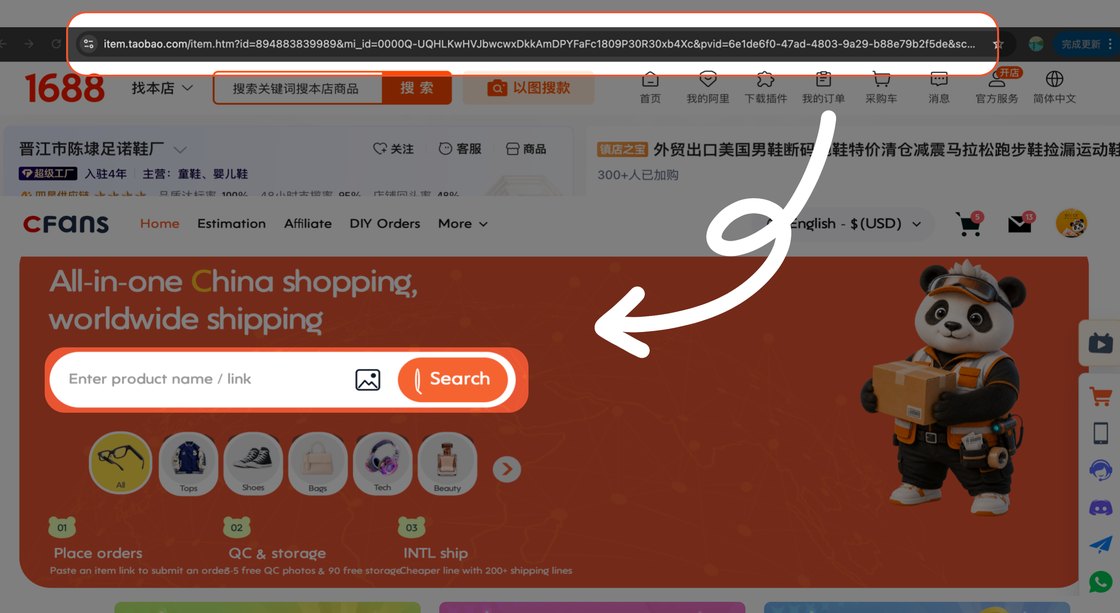
Method one in the official guide: copy the item address, paste it into the search bar. - 2
Rebuild the listing and submit the order
The rebuilt page carries colour, size, quantity, a message box for the seller and a risk notice you have to tick. The notice says the goods come from a third-party platform and that the agent provides purchasing and service rather than any guarantee of the goods themselves.
Quantity is where 1688 differs. Many suppliers there set a minimum order, and the published warnings for that marketplace also cover supplier delays and inconsistencies between batches.
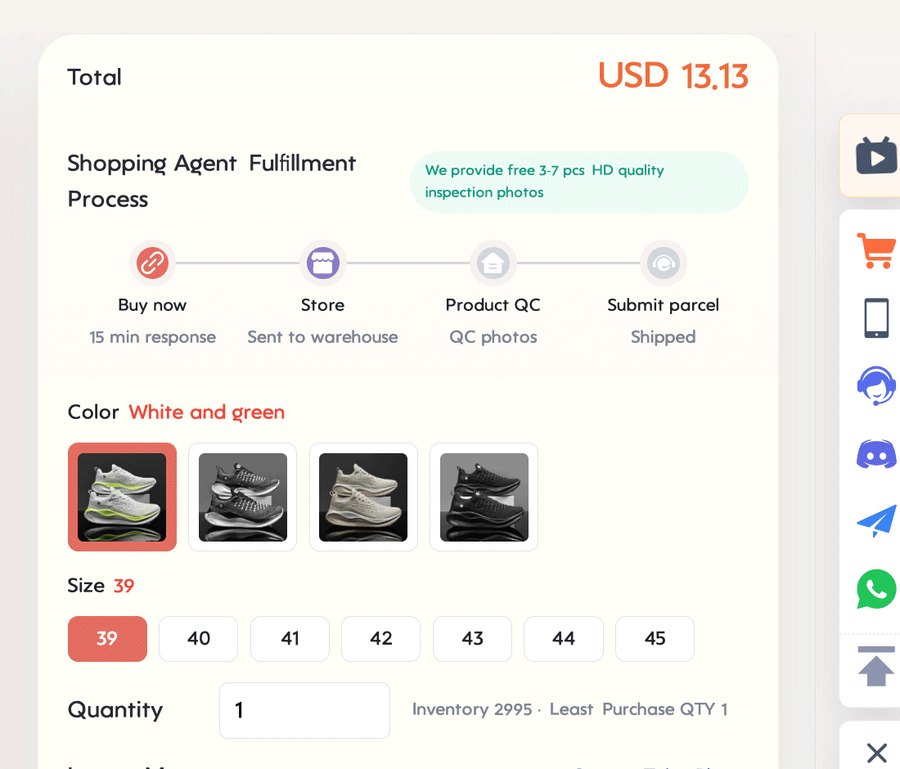
The options panel on a rebuilt listing. The four-stage strip above it is the agent's own summary of what happens next. - 3
Pay for the goods and the leg inside China
The first payment covers the item price and the seller's domestic delivery to the warehouse. International freight is not part of it and is not quoted yet.
Published payment methods are card, PayPal and Google Pay, with a stored wallet balance as a fourth option. Currencies offered at the time of reading were dollars, euros, pounds, Canadian dollars, zloty, Australian dollars and yuan.
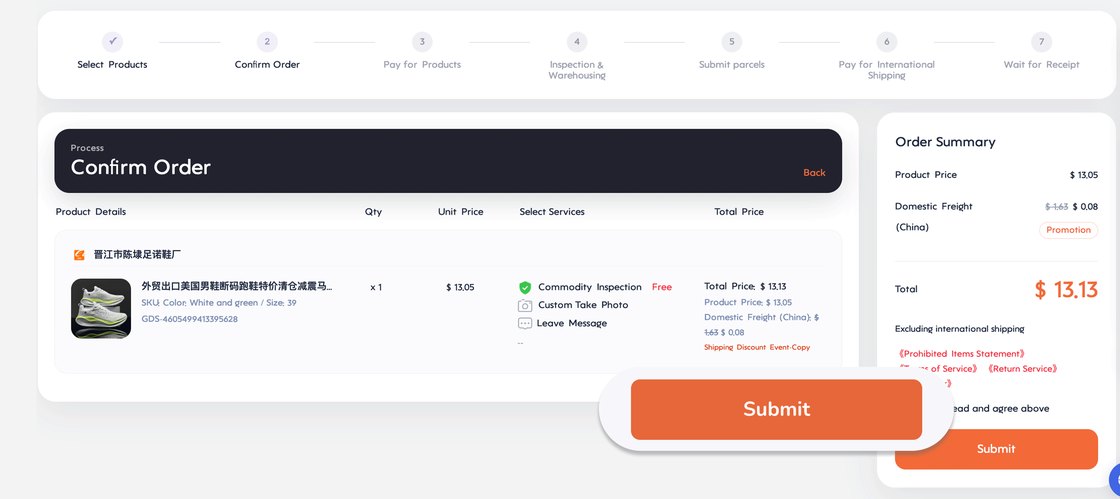
Order confirmation. The domestic freight line sits under the item price, and international shipping is excluded by a note on the right. - 4
The agent buys from the seller
Published handling times: orders submitted between nine in the morning and six in the evening Beijing time are processed within six hours, and orders submitted overnight by two the following afternoon. After payment is confirmed the purchase itself is completed within a day.
Sellers then ship to the warehouse on their own clock, published as three to seven days for most marketplace sellers, with custom and pre-order goods excluded. Arrival at the warehouse is given as three to five working days, up to seven from remote areas.

The buying leg as the agent draws it. Their own file still carries another brand's name on the right, which is why this crop stops where it does. - 5
Inspection, then a shelf in the warehouse
Arrivals are checked for prohibited items and for appearance: style, quantity, colour, size, model, damage, stains. Three to five photographs come back per item, and the piece is repacked and weighed before it is shelved. Published processing time is about three working days.
This is also the moment the return clock starts, and it is short. The published window is five days from warehouse status, counted in hours from the next full hour after the status change.
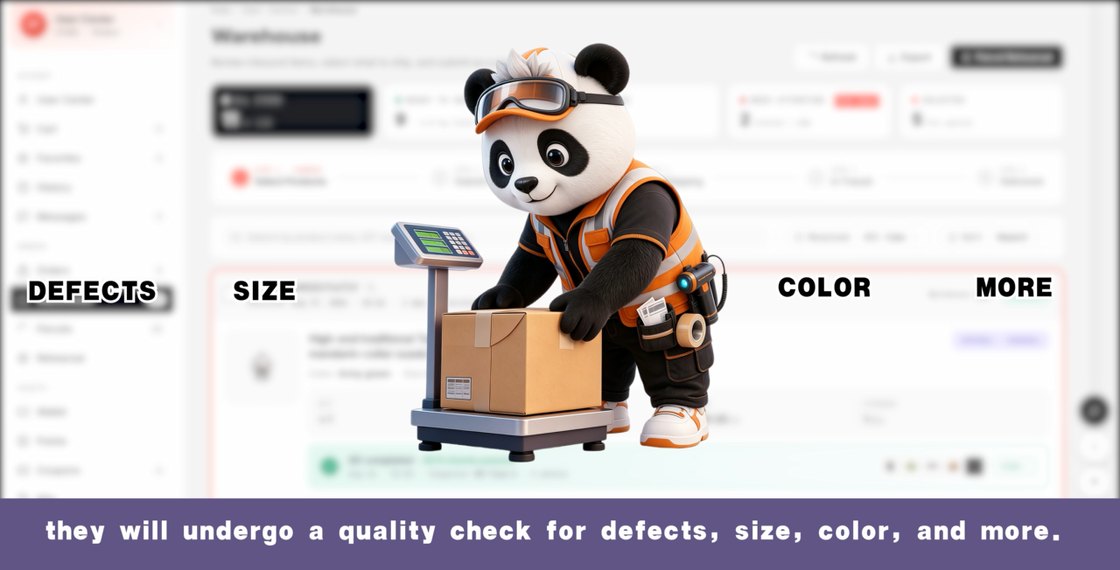
The inspection stage as the official walkthrough video presents it. File dated September 5, 2026. - 6
Choose what goes in the parcel
Everything shelved sits in a warehouse list with its weight, its measured volume and its storage age. You tick the items you want in one parcel, fill in the address, and choose the packing options before anything is quoted.
This screen is where consolidation actually happens. Items bought weeks apart from different sellers become one parcel here, which is the entire reason for shipping through an agent rather than asking sellers to post things directly.
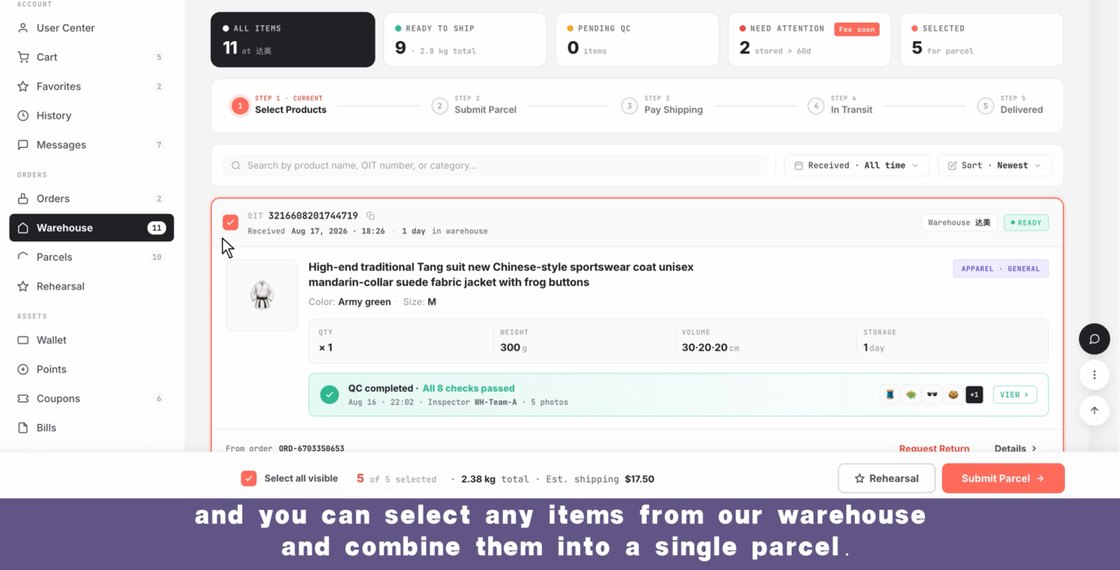
The warehouse list in the official video, with per-item weight and volume visible. Figures on screen are the agent's own demonstration data. - 7
Pay a deposit against an estimated weight
Routes appear once the destination and the contents are known, each with a price, a transit window and a delivery-rate figure. What you pay at this point is a deposit calculated from the estimated weight, the chosen method and the destination.
The published rule for the difference is two-sided: if the final packed weight costs more, you top up before dispatch; if it costs less, the difference returns to your account after shipping. Small gaps may be absorbed by the agent rather than invoiced.
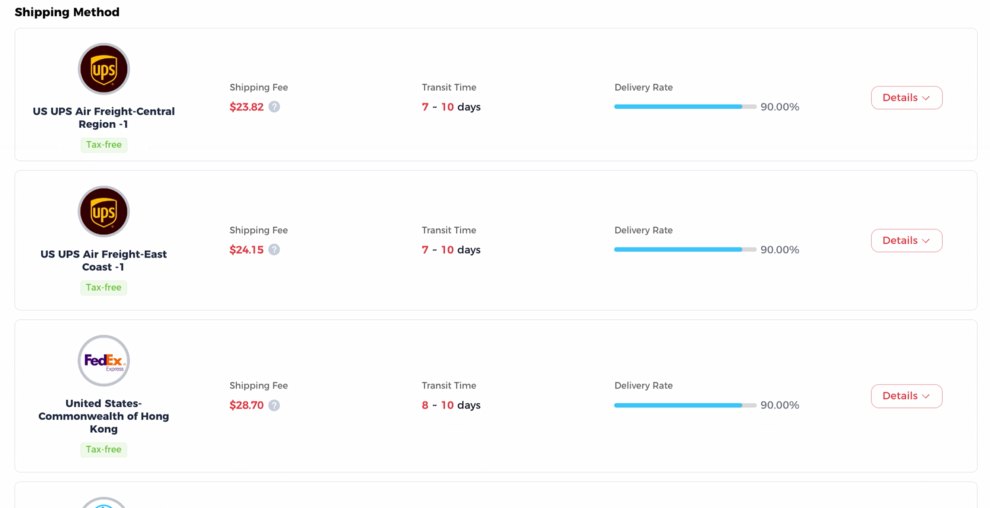
The route picker in the official walkthrough. Prices on screen are the agent's demonstration values for one specific parcel, not a tariff; the address line above them has been cropped away. - 8
Packing, reinforcement and the real weighing
The warehouse consolidates, packs, reinforces whatever you paid to reinforce, weighs the finished parcel and hands it to the carrier. The weight recorded here is the one the carrier prices, and it includes the packaging.
Original courier packaging has already been removed by default at the arrival stage, so what gets packed is the product packaging plus whatever protection you chose.
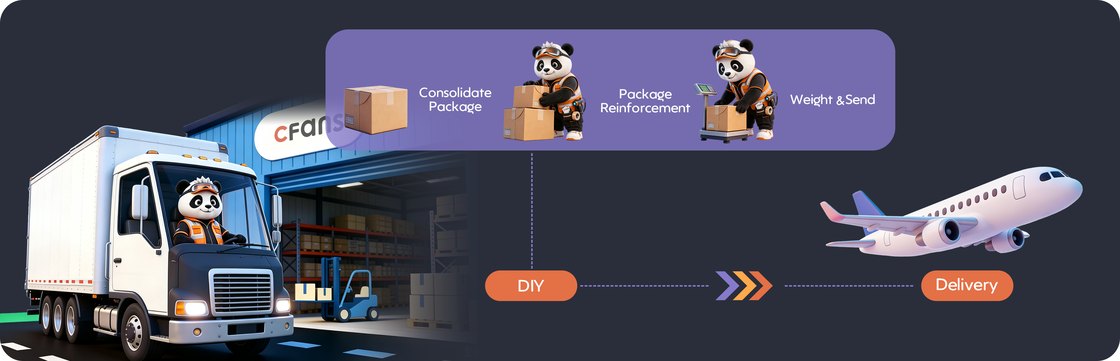
The packing and dispatch leg as the official guide draws it. - 9
Tracking, and who is responsible for what
Parcels appear in a tracking list with the carrier, the billed weight and the status. The published disclaimer for this stage is worth reading before you choose a route: delays, customs inspection, duties and damage in third-party hands are outside the agent's control, and the stated commitment is to help rather than to guarantee.
If tracking stops updating, the published reasons are flight scheduling, customs inspection, clearance delays and last-mile backlogs. The help centre lists the last-mile carriers' own tracking sites for exactly this.
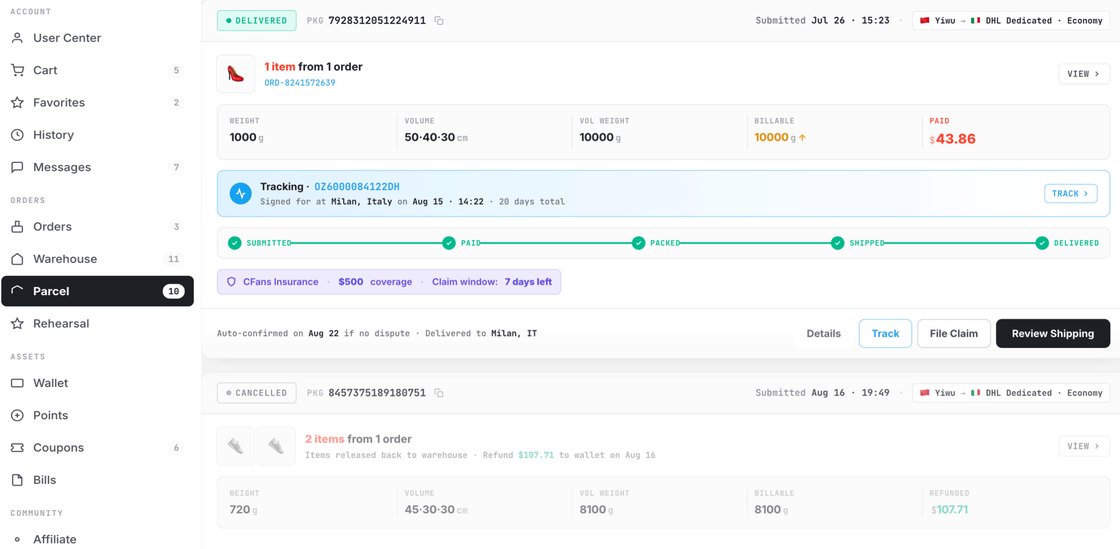
The parcel view. Weight, volume and billed weight sit side by side, which is the clearest place to see which of the two was charged. - 10
Sign for it, check it, then close it
The published signing advice is specific: inspect before signing, note damage on the waybill or refuse the parcel, and keep the outer box if anything is missing. Reports go to the local carrier or post office within two days, and to support within seventy-two hours.
Confirming receipt in the account closes the order and starts the shorter of the two after-sales clocks. Leaving it unconfirmed does not extend things forever: the published cap is forty-five days from dispatch either way.
What the walkthrough does not mention
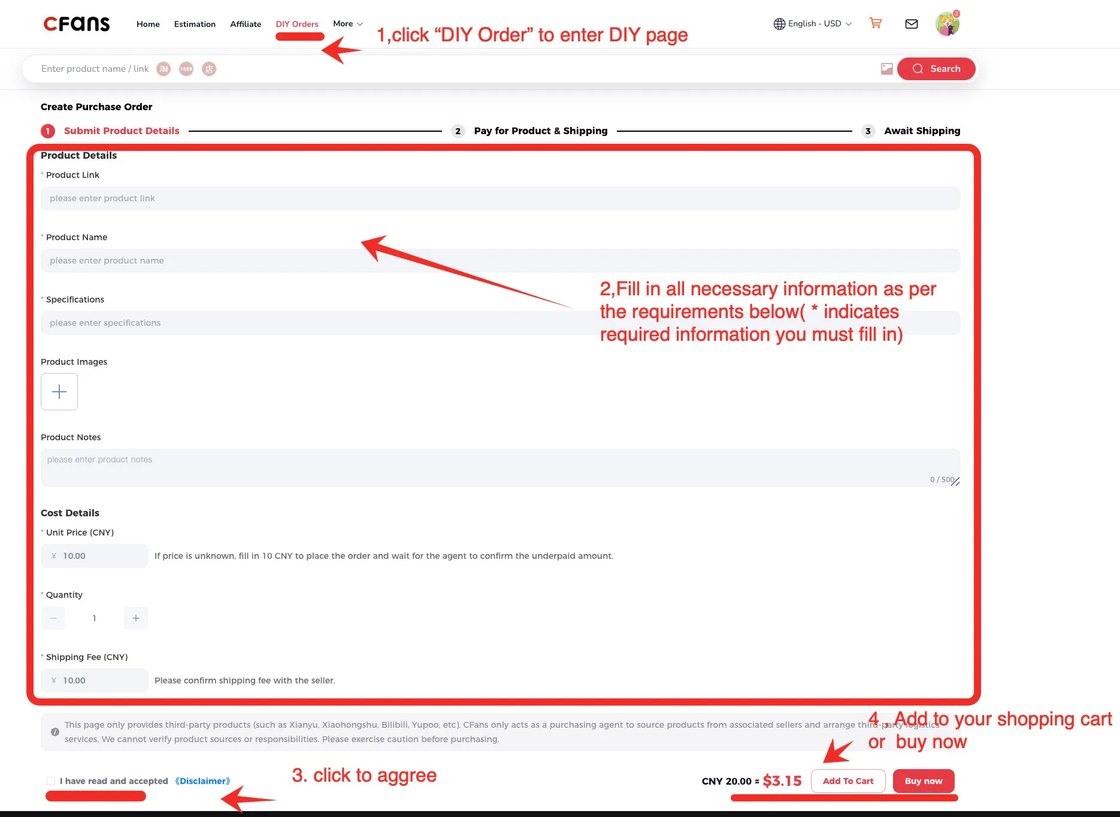
- Manual orders. Links the search bar cannot rebuild go through a separate form where you type the address, name, specifications, quantity and price yourself. The form's own note is that if you do not know the price, enter ten yuan and wait for the agent to confirm the shortfall.
- Supplementary payments. Sellers change prices and domestic freight between your order and the purchase, and the difference is billed to you on the order page.
- Remote-area surcharges. These are set and collected by the carrier based on the delivery address, not by the agent.
- Order status words. The published list runs from payment pending, valid for seventy-two hours, through purchased, seller sent, stock arrived, inspection completed and stored, to shipped and received, with a final state where storage has expired and ownership has passed to the platform.
Pages that pick up from here
- Account, payment and the coupon machinery Registration rules, handling fees, wallet, membership levels and points.
- Reading the inspection photographs What the standard covers, what it refuses to judge, and the paid upgrades.
- The warehouse clock Free storage, renewal prices, repacking defaults and the packing menu.
- Weight that gets billed Estimated, packed and volumetric, and why the deposit moves.